

Product photography has changed faster in the last two years than in the previous decade. What used to require weeks of studio time, multiple retouching rounds, and extensive manual editing now moves in a fraction of that time. The reason is AI.
As e-commerce scales and brands need hundreds or thousands of product images monthly, the ability to scale product photography with AI has stopped being a competitive advantage and become a baseline requirement. Recent research shows 83% of photographers now use AI in their automated workflows. Whether you're managing a growing catalog or turning around seasonal campaigns, knowing how to use AI effectively can reshape your entire production pipeline.
The New Reality of Product Photography at Scale
Volume demands have exploded. Brands selling across multiple platforms, each with different image specs, now need 10-15 variations of every product shot. Stack seasonal campaigns, A/B testing, and the constant appetite for fresh visual content on top of that, and photography teams hit a wall fast.
Traditional workflows can't keep up. A skilled retoucher handles 20-30 images per day. Background removal, color correction, and shadow work eat hours. When you're launching 200 new SKUs a month, the math doesn't work.
AI is what fixes that. Modern tools process thousands of images at consistent quality, handling complex edits that previously required expert human judgment. The technology doesn't replace photographers. It removes the bottlenecks that keep them from doing their best work.
What AI Actually Does in Product Photography
AI in product photography isn't one thing. It's several distinct technologies working in sequence:
- Background removal and replacement using semantic segmentation
- Automatic color correction based on product category learning
- Shadow and reflection generation matched to lighting conditions
- Image upscaling that preserves detail while increasing resolution
- Batch processing that applies consistent edits across entire catalogs
- Smart cropping that identifies optimal composition automatically
The most powerful applications chain these capabilities together. Automated background removal, followed by consistent color grading, followed by intelligent shadow placement, with no manual intervention between steps.
Building an AI-Enhanced Photography Workflow
Successfully scaling product photography with AI isn't about adopting new tools. It's about redesigning your workflow to use AI at the right points while keeping human control where it counts.
Start with high-quality source images. AI enhances and automates. It doesn't rescue poor photography. Proper lighting, focus, and composition are still non-negotiable. That's where professional product photography services establish the foundation everything else builds on.


Define your image standards before you touch any AI tool. Create reference images showing approved backgrounds, shadow styles, color accuracy, and composition. AI performs best when it has a clear target to match.
Structure your batching strategy. Group products by shared characteristics: size, material, color palette, output format. This lets AI apply category-specific processing rules more accurately across the board.
The Three-Stage Processing Pipeline
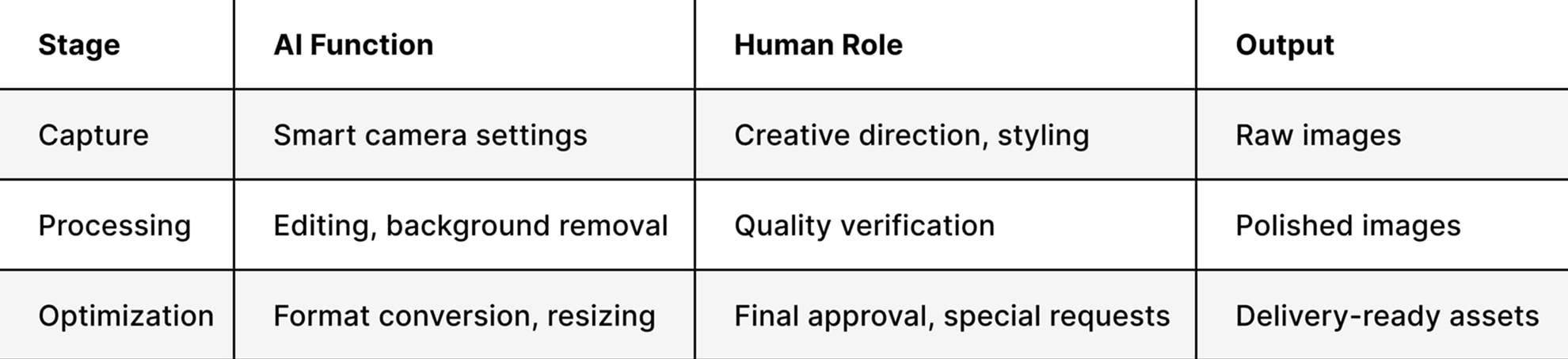
This pipeline creates clear checkpoints where human expertise adds real value, while AI handles the repetitive technical work. Your team focuses on creative decisions and quality control instead of manual retouching.
For catalog photography, this approach can reduce production time by 60-70% while holding consistent quality across thousands of images. The essential guide to product photography workflow covers additional strategies for optimizing the process.
Practical AI Tools for Different Photography Needs
Different product categories require different AI capabilities. A jewelry brand needs something different from a furniture company shooting large-format items.
Background Removal and Replacement
AI background tools have become genuinely sophisticated. They detect product edges accurately, preserve fine details like fabric texture or hair, and generate realistic shadows and reflections. Major camera manufacturers have taken notice: Canon and Panasonic are already investing in AI startups focused on image generation from product photos.
The practical application: shoot once on white, then generate versions with lifestyle scenes, colored backdrops, or seasonal settings through AI. One shoot, multiple outputs.
This is core to how Squareshot's AI services work in practice: products are photographed to a professional standard, then AI handles background generation and scene placement across whatever contexts your channels require. The source material is shot with enough quality and consistency that AI processing produces clean, usable results rather than artifacts that need manual correction.
Color Correction and Consistency
Maintaining color accuracy across hundreds of products shot over weeks or months is one of the hardest problems in catalog photography. AI color correction analyzes your reference standards and applies consistent adjustments automatically.
The technology recognizes materials — fabric, metal, glass — and applies appropriate corrections for each. It compensates for lighting variations between sessions, keeping your entire catalog visually coherent regardless of when or where products were shot.
- Automatic white balance correction across batches
- Material-specific color enhancement for skin tones, fabrics, and metals
- Consistent color temperature across different lighting setups
- Automatic correction for common color casts
Intelligent Image Enhancement
Beyond corrections, AI enhances product images in ways that matter for e-commerce. Sharpening that preserves natural texture. Noise reduction that doesn't strip important detail. Resolution upscaling that adds genuine information rather than just interpolating pixels.
For e-commerce product photography, where images need to hold up across devices from mobile to 4K displays, this enhancement capability is worth a lot.
Quality Control: Where Human Expertise Still Matters
Client surveys show most people don't notice the difference between AI-edited and manually edited work for most applications. That's a strong signal about how far AI quality has come. But certain situations still need human judgment.
Complex reflective surfaces — jewelry, chrome, polished metal — require careful attention. AI can generate inconsistent highlight patterns or struggle with intricate reflections. For jewelry product photography, human retouchers still add critical value at the final quality check stage.
Brand-specific aesthetic requirements often need human interpretation. AI can match technical specifications. Understanding a brand's visual language requires creative judgment that current tools don't replicate reliably.
Edge cases and unusual products — transparent elements, complex textures, irregular shapes — sometimes need manual intervention to get right.
Creating Effective AI Quality Checkpoints
Build quality control into the workflow rather than treating it as a final step:
- Automated quality scoring flags images outside acceptable parameters
- Random sampling pulls 10% of AI-processed images for human review
- Client feedback loops identify recurring issues to refine AI settings
- Category-specific review applies stricter standards to high-value products
This layered approach catches problems early without killing production speed. You're not reviewing everything manually. You're making sure nothing problematic gets through.
Scaling Without Losing Brand Quality
The hardest part of scaling product photography with AI is maintaining the visual identity that makes your brand recognizable. Generic automation produces generic results.
Develop custom AI presets that encode your brand guidelines. Train AI tools on your approved reference images rather than relying on generic auto-correct functions. The output matches your specific aesthetic, not a default commercial look.
Keep professional photography for hero images. AI handles catalog volume efficiently. Invest human creativity in hero shots and lifestyle imagery that define your brand presence. Use AI for the 80% of straightforward catalog work, and reserve photography talent for the 20% that drives brand perception.
Not every product image needs the same level of attention or budget. Tiered processing lets you allocate resources where they actually drive results.
Hero images, homepages and campaigns, warrant full manual photography with selective AI enhancement. The quality target here is exceptional, and there's no shortcut worth taking. Primary images on product pages and main listings sit one level down: professional photography with AI enhancement gets you to excellent, which is the right standard for anything a customer scrutinizes before buying.
Supplementary shots, additional angles and detail views, can run on standardized lighting with AI processing, landing at very good quality without the full production cost. Archive images for internal use and quick reference need only automated capture with basic AI cleanup. Good is enough when no customer is making a purchase decision based on what they see.
This approach allocates resources where they generate maximum impact. Your 7 types of e-commerce images don't all need identical production investment.
Advanced Applications: Creative AI Use Cases
Beyond automation, AI expands creative possibilities that would be impractical at scale any other way.
Seasonal and Campaign Variations
Photograph products once on neutral backgrounds, then use AI to generate summer outdoor settings, winter holiday themes, or spring backdrops. Seasonal freshness without seasonal reshoots.
Multi-Platform Optimization
Amazon requires specific image dimensions and formats. Instagram favors square compositions. Pinterest performs better with vertical orientations. AI generates optimized versions for each platform from a single master image. The best AI tools for product photos now include intelligent cropping that identifies the product within the frame and creates platform-specific compositions that maintain visual impact across different aspect ratios.
Lifestyle Scene Generation
Emerging AI capabilities can place products into realistic lifestyle settings. The technology is still evolving and requires careful quality control, but it offers real potential for context shots without expensive set builds or location costs.
Integration Strategies for Existing Workflows
Adding AI to an established photography operation requires deliberate implementation. Rushing adoption creates confusion and quality issues that take time to unwind.
Start with a pilot program. Pick one product category or a specific bottleneck to test AI solutions. A contained approach lets you learn the technology's strengths and limits without disrupting the whole operation.
Train your team properly. Photographers and retouchers need to understand what AI does well and where it needs human guidance. This is about augmenting skills, not bypassing them. Hands-on training with your specific tools and workflows is non-negotiable.
Document your AI workflows. Create clear process guides covering when AI applies, which settings to use for different product types, and how to recognize when manual intervention is needed. Documentation ensures consistency as team members change or new staff come on.
Building the Right Technology Stack
Your AI photography stack should integrate cleanly with existing systems:
- Camera and capture software with AI-assisted settings
- Background removal tools that batch process without sacrificing quality
- Color correction platforms trained on your brand standards
- Digital asset management that tags and organizes AI-processed images
- Quality control systems that flag problematic outputs for review
The goal is a seamless pipeline where images flow through AI processing with minimal manual handoffs. Each tool should connect to the next without requiring export, conversion, and reimport between steps.
Cost-Benefit Analysis: Understanding ROI
AI photography solutions require real investment in software, training, and workflow redesign. Understanding the return justifies the cost.
Time savings are the most immediate benefit. If AI reduces editing time per image from 15 minutes to 3 minutes and you process 1,000 images monthly, that's 200 hours saved. At $50 per hour for a skilled retoucher, that's $10,000 in monthly labor cost reduction.
Increased output capacity lets you scale without proportionally increasing headcount. A team that previously handled 500 products monthly can reach 2,000 with AI assistance.
Consistency improvements reduce reshoots and revisions. Standardized AI processing eliminates the variation that occurs when different team members handle similar work at different times.
Factor in the full cost picture though: training time, workflow redesign, quality control infrastructure, and outputs that need human correction. Most photography operations see ROI within 3-6 months when AI is implemented strategically.
Future-Proofing Your Photography Operation
The tools available in late 2026 are dramatically more capable than those from two years ago, and the pace isn't slowing. Staying current requires ongoing adaptation.
Invest in flexible, adaptable systems rather than locked-in proprietary solutions. Look for AI tools with APIs that integrate across multiple platforms, giving you options as the technology landscape shifts.
Protect core photography expertise. AI handles increasing amounts of technical work. Creative vision and understanding of visual communication remain irreplaceable. Keep developing creative product styling and composition skills that differentiate your work from automated output.
Build feedback loops into your AI systems. The most effective implementations improve over time through training on your specific needs. Track which automated outputs need correction and use that data to refine settings and processes continuously.
The strategic question of when to use AI product photography versus traditional photography will keep evolving as capabilities advance. Build a framework for that decision now rather than making it ad hoc each time.
Ethical Considerations and Transparency
Scaling with AI carries responsibilities worth taking seriously.
Be clear about AI-generated versus AI-enhanced imagery. Using AI to remove backgrounds from traditionally photographed products is different from generating entirely synthetic product images. Most clients accept AI enhancement of real photography without hesitation. Fully generated imagery is a different conversation.
Don't use AI to misrepresent products. The goal is efficiency in presenting accurate product information. Generating details, colors, or features that don't exist crosses a line that damages customer trust and drives returns.
Verify the ethics of your AI tools' training data. Ensure the platforms you use were trained on appropriately licensed imagery. This protects your business and your clients from legal exposure.
Use AI to improve working conditions, not just cut headcount. The best implementations eliminate tedious volume work and free photographers to focus on creative and strategic projects. That's a different proposition from simply replacing skilled professionals with automation.
AI has fundamentally changed what's possible in product photography at scale, making high-quality imagery achievable at volumes and speeds that weren't realistic before. The brands winning with this technology aren't the ones who automated everything. They're the ones who identified where AI creates leverage and where human expertise still drives the outcome.
Squareshot combines advanced AI capabilities with experienced photography professionals to deliver scalable, high-quality product imagery built around your specific business needs, whether you need 50 images or 5,000.
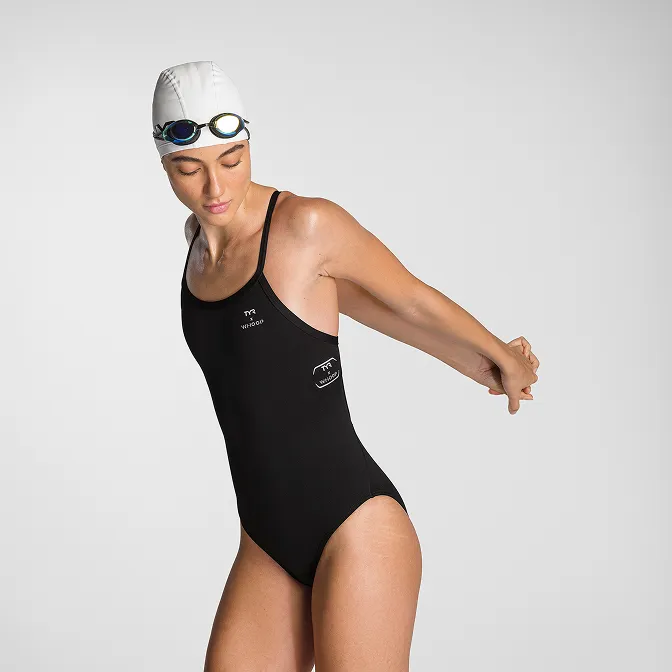
Product A
SQUARE SHOT