

Selling on Amazon requires more than just great products. Your images serve as the digital storefront, and getting the technical specifications right can mean the difference between a scroll-past and a conversion. Amazon product image dimensions have specific requirements that sellers must follow to ensure their listings appear professional, load quickly, and trigger the zoom feature that customers expect.
Understanding these technical standards isn't just about compliance; it's about creating a visual experience that drives sales and builds trust with potential buyers.
Understanding Amazon's Core Image Requirements
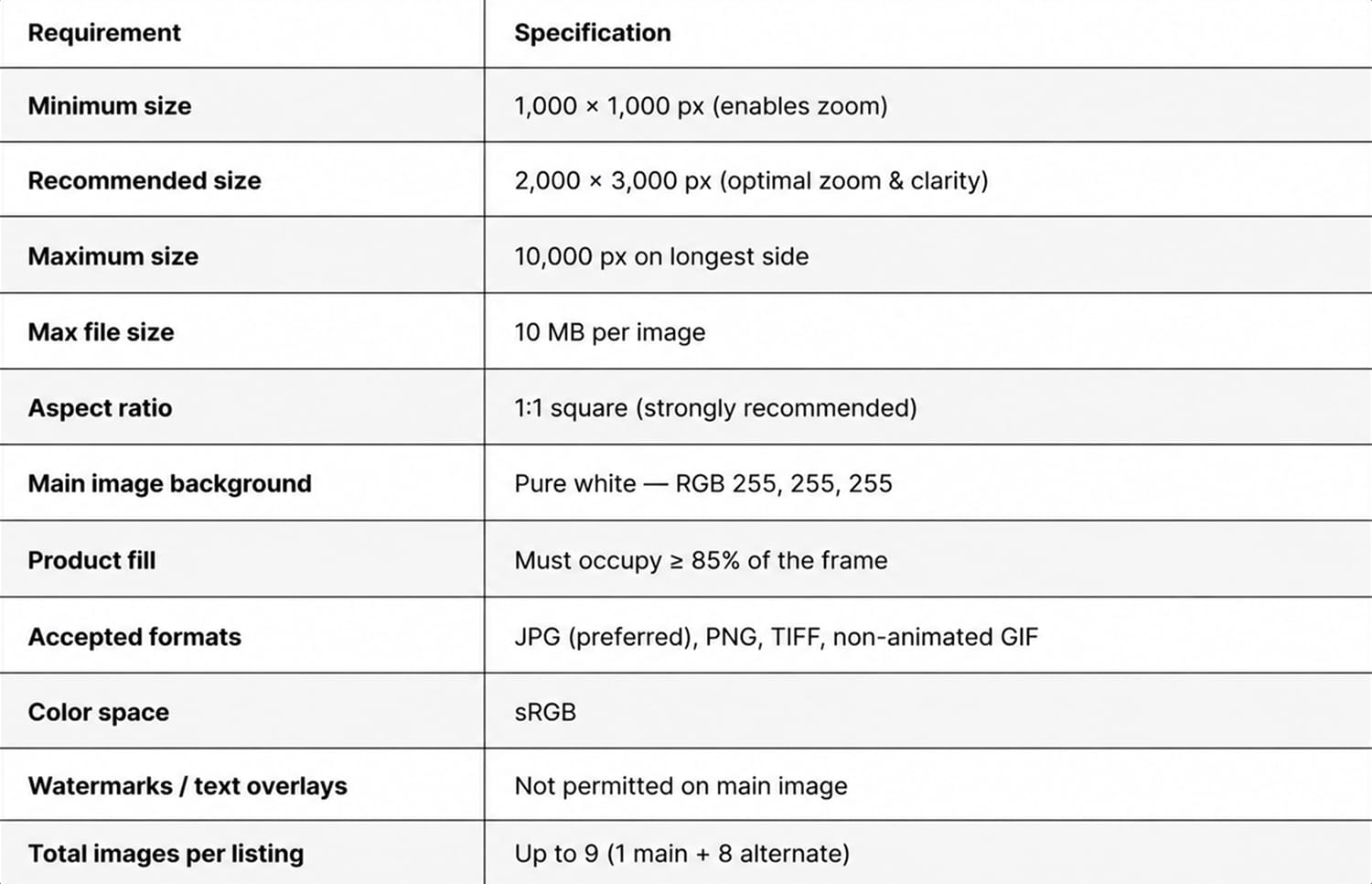
Amazon maintains strict standards for product images across all categories. The marketplace demands a minimum image size of 1000 pixels on the longest side, but this baseline barely scratches the surface of what creates a successful Amazon listing.
Minimum vs. Optimal Dimensions
The 1000-pixel minimum exists for a specific reason: it enables Amazon's zoom functionality. When customers hover over or click your main image, they expect to see fine details that help them make purchasing decisions. Without meeting this threshold, your listing loses this crucial feature.
However, smart sellers aim higher. The sweet spot for Amazon product image dimensions falls between 2000 and 3000 pixels on the longest side. This range provides several advantages:
- Crystal-clear zoom capability that reveals texture, materials, and craftsmanship
- Future-proofing against display technology improvements
- Compatibility with 4K and high-resolution mobile screens
- Professional appearance that builds brand credibility
Larger files don't always mean better performance. Images exceeding 10,000 pixels on either side face rejection during upload. Amazon also enforces a 10MB file size limit per image, which balances image quality with page load speed.
File Format Specifications
Amazon accepts multiple image formats, but not all deliver equal results. JPEG remains the preferred choice for most product photography, offering excellent compression while maintaining visual quality. TIFF files provide superior quality but create unnecessarily large files. PNG works well for images that require transparency, though Amazon converts the main images to white backgrounds anyway.
The technical naming convention matters too. Amazon requires specific naming patterns that include your product's ASIN or UPC, followed by a variant code. For example, a main image might be named "B08XYZ1234.MAIN.jpg" while additional views use "B08XYZ1234.PT01.jpg" for the first alternate angle.
Aspect Ratios and Framing Guidelines
The shape of your images impacts how products display across Amazon's ecosystem. While Amazon image dimensions focus on pixel counts, aspect ratios determine the visual presentation and compatibility with different browsing contexts.
Square Images: The Amazon Standard
Amazon strongly recommends a 1:1 square aspect ratio for all product images. This preference stems from consistency across the platform. Square images display uniformly in search results, category pages, mobile apps, and desktop browsers without awkward cropping or letterboxing.


When shooting products for Amazon, frame them to fill 85% of the image area. This guideline ensures products appear substantial without touching frame edges, which can trigger rejection. The remaining 15% provides breathing room and professional presentation.
Consider these framing approaches for different product types:
- Small items (jewelry, cosmetics): Center the product with generous white space
- Medium products (electronics, kitchenware): Position slightly off-center using the rule of thirds
- Large items (furniture, appliances): Fill the frame while maintaining required margins
- Apparel: Show full garment with proportional spacing, top and bottom
Handling Non-Square Products
Some products naturally resist square framing. Long items like baseball bats, narrow products like ties, or wide objects like yoga mats present framing challenges. The solution involves strategic composition rather than forcing awkward proportions.
For elongated products, position them diagonally within the square frame. This maximizes size while maintaining the required aspect ratio. Alternatively, include relevant accessories or packaging elements to balance the composition and fill empty space naturally.
Main Image vs. Alternate Image Requirements
Amazon distinguishes between main images and supplementary photos, each serving distinct purposes with slightly different rules.
Main Image Non-Negotiables
Your primary listing image faces the strictest requirements. It must feature a pure white background (RGB 255, 255, 255). The product must fill the frame appropriately and appear in actual use context only for certain categories. Props, text overlays, watermarks, and lifestyle settings are prohibited.
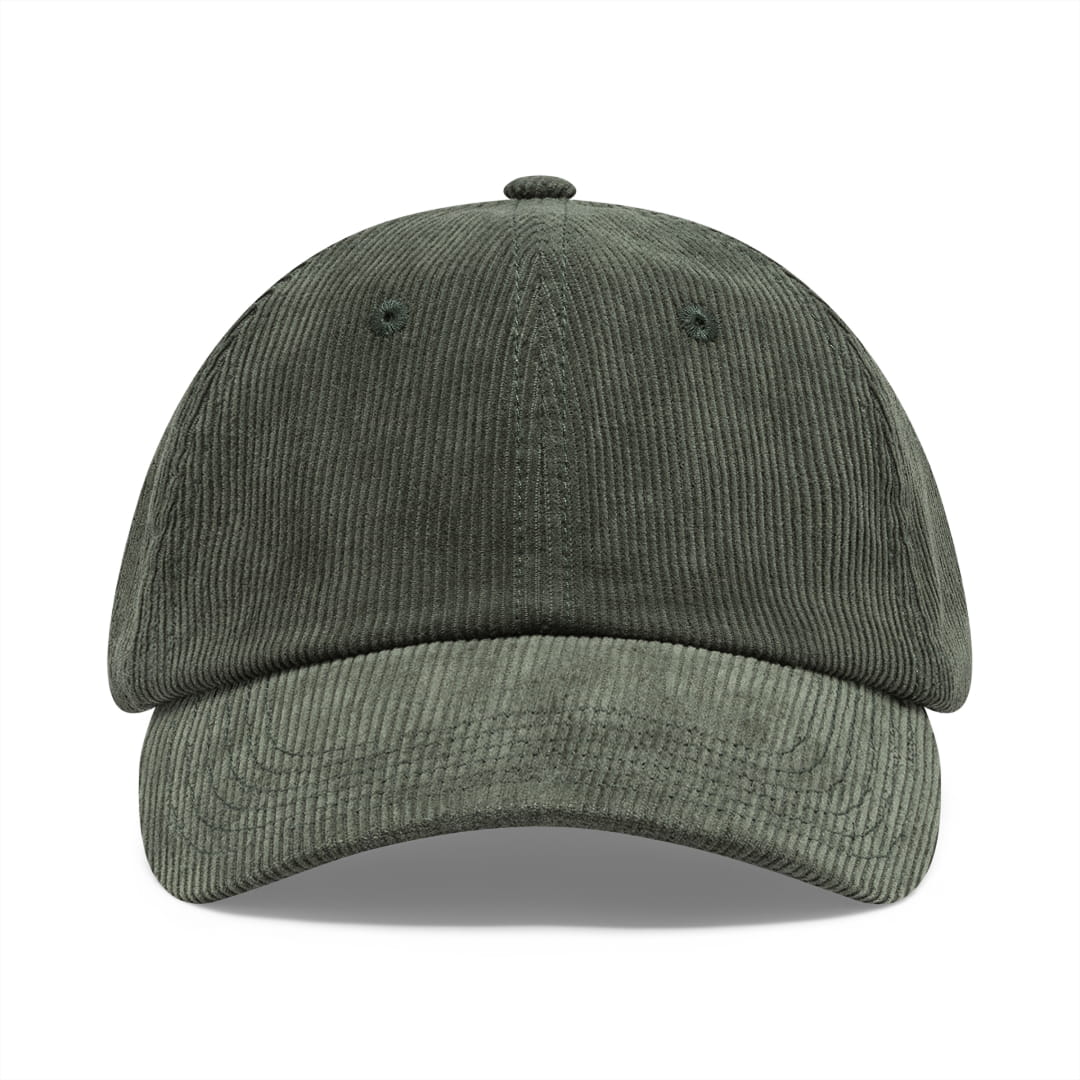
These restrictions exist because the main product images appear in search results, where consistency helps customers compare products quickly. A main image serves as your first impression, often viewed on small mobile screens where clarity matters more than creativity.
Working with white background studio setups ensures your main images meet Amazon's exacting standards while effectively highlighting product features.
Alternate Image Flexibility
Additional product images offer significantly more creative freedom. Amazon allows up to nine total images per listing, with slots 2-9 providing opportunities for:
- Different angles showing all product sides
- Close-up details highlighting materials, textures, and craftsmanship
- Size comparison shots with common reference objects
- Infographics explaining features and benefits
- Lifestyle imagery showing real-world use
- Packaging and unboxing presentations
These supplementary images don't require white backgrounds, though many successful sellers maintain consistency across the entire image set. The e-commerce image standards that drive conversions often involve showing products from multiple perspectives with professional lighting and composition.
Technical Optimization for Performance
Meeting Amazon product image dimensions requirements represents just the starting point. Optimization ensures images load quickly, display properly, and convert browsers into buyers.
Color Space and Profile Management
Amazon's system processes images through automated workflows that can alter appearance if color profiles aren't properly embedded. Always work in the sRGB color space, which matches how web browsers display images. Adobe RGB profile may look perfect on your calibrated monitor, but appear oversaturated or color-shifted when uploaded.
Before exporting images, convert to sRGB and embed the color profile. This simple step prevents unexpected color changes that make products appear different from what was intended. For products where color accuracy matters critically (paint, fabric, cosmetics), include a color calibration chart in one alternate image to set customer expectations.
Resolution and DPI Considerations
The debate around DPI (dots per inch) for web images confuses many sellers. Here's the truth: DPI settings are irrelevant for screen display. Whether your image metadata shows 72 DPI or 300 DPI, browsers only care about pixel dimensions.
However, DPI matters if customers download and print product images. Setting 300 DPI in your master files ensures printed materials look sharp if buyers create their own documentation or comparison charts. This setting doesn't increase file size when pixel dimensions remain constant.
Compression Strategies
File size directly impacts page load speed, which in turn affects both the customer experience and Amazon's search algorithm. The challenge is balancing visual quality with file-size constraints.
JPEG compression quality between 85% and 95% typically provides the optimal balance. Below 85%, artifacts become visible on product details. Above 95%, file sizes balloon without proportional quality improvements. Test different compression levels and compare results at actual display sizes, not zoomed to 200% in editing software.
Modern compression tools like MozJPEG or Squoosh can reduce file sizes by 20-30% compared to standard JPEG encoders without visible image quality loss. These tools employ advanced algorithms that preserve edge sharpness and fine details while eliminating redundant data.
Category-Specific Dimension Considerations
Different product categories on Amazon sometimes have unique image requirements beyond the standard Amazon product image dimensions specifications.
Apparel and Fashion
Clothing listings benefit from consistent model photography or ghost mannequin techniques. Amazon recommends showing garments on live models or forms that demonstrate fit and drape. For consistency, maintain the same model positioning, lighting setup, and camera height across all clothing items in your catalog.
The ghost mannequin photography approach works particularly well for Amazon because it shows garment shape without distraction while meeting the white background requirement for main images. This technique requires careful post-processing to remove mannequin parts and create clean, professional presentations.
Electronics and Technical Products
Tech products often require multiple detail shots showing ports, buttons, screens, and included accessories. Size these detail images to match the dimensions of your main product shot to maintain consistent zoom functionality. Customers shopping for electronics expect to verify specifications visually, making high-resolution images essential.
Home Goods and Furniture
Larger items present scale communication challenges. Include reference objects (but not in the main product images) or create comparison graphics that show dimensions relative to common household items. For furniture, showcase the product in realistic room settings using alternate image slots while ensuring your main image meets the isolated-on-white requirement.
Mobile Optimization Strategies
Over 70% of Amazon traffic comes from mobile devices in 2026, making mobile image optimization crucial for sales success.
Thumbnail Clarity
Your main image appears as a small thumbnail in search results and category pages. At these reduced sizes (typically 160-200 pixels), intricate details disappear. Design your main image composition to read clearly even when dramatically scaled down.
Test this by viewing your images on actual mobile devices or using thumbnail simulators. Products should be instantly recognizable at thumbnail size without requiring users to tap for a larger view. Simple, clean compositions with strong contrast between product and background perform best.
Vertical Space Utilization
Mobile screens are vertical, but Amazon’s square image format is already designed to work well within this layout. What matters is how you use the vertical space within your square frame. Avoid placing critical product details exclusively at the top or bottom, where mobile UI elements might overlap them.
Consider these mobile-specific factors:
- Touch targets must be larger than desktop click areas
- Zoom gestures feel natural and are used frequently
- Users scroll vertically but resist horizontal swiping
- Loading speed impacts bounce rates more severely on mobile
The product image optimization strategies that work for desktop often need refinement for mobile contexts where screen real estate and bandwidth are limited.
Common Dimension Mistakes to Avoid
Even experienced sellers make preventable errors with their product photography that hurt their Amazon listing performance.
Undersized Images
Uploading images below the 1000-pixel minimum remains the most common mistake. These images can't enable zoom, immediately disadvantaging your listing against competitors. Worse, they signal unprofessionalism to potential buyers who expect crisp, detailed product views.
If your existing product photos fall short of Amazon's product image dimensions requirements, resist the temptation to upscale them artificially. Enlarging small images through software creates blurry, pixelated results that look worse than keeping them at their original size. Instead, reshoot products properly using appropriate camera equipment and lighting.
Inconsistent Sizing Across Catalog
Maintaining uniform image dimensions across your entire product catalog creates a cohesive brand presence. When some listings use 2000-pixel images while others use 1500 or 3000 pixels, the inconsistency becomes noticeable in category browsing and multi-product comparison views.
Establish standard dimensions for your catalog and stick to them. This consistency simplifies workflow, reduces processing time, and ensures customers receive identical experiences across your product range. The consistency in product photography extends beyond dimensions to lighting, angles, and styling choices.
Incorrect Aspect Ratios
Some sellers shoot products in 16:9 or 4:3 ratios, then add white bars to create square images. This approach wastes valuable pixels and makes products appear smaller than they need to be. Always compose and shoot in square format from the start, maximizing the product's presence within the frame.
Over-Cropping for Social Media
Products photographed primarily for Instagram or Pinterest often feature tight crops that eliminate context and breathing room. These compositions rarely work well for Amazon, where technical compliance and clear product presentation outweigh artistic expression. Shoot specifically for Amazon's requirements rather than repurposing social media content.
Professional Photography Setup Recommendations
Achieving proper Amazon product image dimensions starts with the right equipment and environment, not just post-processing adjustments.
Camera and Lens Selection
Modern cameras offer more than enough resolution for Amazon's requirements. A 24-megapixel camera produces images around 6000 x 4000 pixels, far exceeding Amazon's needs. Even mid-range cameras from the past five years provide sufficient quality.
Lens choice matters more than megapixel count. A quality 50mm or 100mm macro lens allows you to capture products at appropriate distances while maintaining sharpness across the entire frame. Avoid wide-angle lenses, which distort product proportions and create unnatural perspective issues.
Lighting Configurations
Consistent, even lighting eliminates shadows and hotspots that distract from product features. A three-light setup (key light, fill light, backlight) delivers professional results for most products. Softboxes or diffusion umbrellas create the soft, shadowless illumination Amazon listings demand.
For smaller products, a lightbox or light tent simplifies achieving pure white backgrounds and even illumination. These tools cost far less than full studio lighting kits while producing excellent results for items measuring less than 12 inches in any dimension.
Shooting Tethered for Precision
Connecting your camera directly to a computer during shoots provides immediate feedback on composition, focus, and exposure. This tethered shooting approach catches dimension and framing issues before you finish the session, preventing costly reshoots.
Review images at 100% magnification during shoots to verify sharpness and detail retention. What looks acceptable on a small camera LCD often reveals focus problems when viewed full-size on a monitor.
Batch Processing and Workflow Efficiency
Managing image dimensions efficiently across large catalogs requires systematic workflows and automation tools.
Creating Action Presets
Photo editing software allows you to record repetitive tasks as actions or presets. Create dimension-specific presets that:
- Resize images to your standard Amazon product image dimensions
- Convert color space to sRGB
- Apply appropriate sharpening for web display
- Export with optimal compression settings
- Rename files according to Amazon's naming conventions
These automated workflows reduce processing time from minutes to seconds per image while ensuring consistency across hundreds or thousands of product photos.
Amazon Image Upload Checklist — 2026
Before uploading, confirm every image passes these checks:
- Image is at least 1,000 × 1,000 px (2,000+ recommended)
- File size is under 10 MB
- Format is JPG, PNG, TIFF, or GIF
- Color space is set to sRGB
- Main image has a pure white background (RGB 255, 255, 255)
- Product fills at least 85% of the frame
- No watermarks, logos, or text overlays on the main image
- Aspect ratio is 1:1 square
- File name follows Amazon's convention (e.g.,
B08XYZ1234.MAIN.jp) - Alternate images (slots 2–9) are optimized for detail, lifestyle, and infographics
A checklist approach prevents upload errors that result in rejected images or listing suppressions. When working with professional product photography services, clarify these technical requirements upfront to ensure deliverables match Amazon's specifications exactly.
Archiving Master Files
Always maintain high-resolution master files separate from your optimized Amazon uploads. These masters should be uncompressed or minimally compressed TIFFs or PSDs containing all layers and adjustments. When Amazon updates requirements, or you need images for other platforms, having clean masters prevents generation loss from re-editing compressed JPEGs.
Store masters with logical naming conventions that match your inventory system. Include dimension information in folder names (e.g., "Masters_3000px" vs "Amazon_Uploads_2500px") to quickly identify which versions serve which purposes.
Testing and Performance Monitoring
After uploading images that meet Amazon product image dimensions standards, track their performance and make data-driven improvements.
A/B Testing Image Variations
Amazon Brand Registry participants can access A/B testing tools for main images. Test different compositions, backgrounds, or styling approaches while maintaining consistent technical specifications. Monitor metrics like click-through rate, conversion rate, and detail page views to identify which images resonate with your target audience.
Even without official A/B testing access, you can rotate different main images periodically and track sales performance during each period. This informal testing reveals which visual approaches drive the best results for your specific products and customer base.
Analyzing Customer Behavior
Amazon provides heat maps and click data showing which images customers interact with most frequently. If customers consistently click to specific alternate images rather than staying on the main image, consider whether those angles or details should become your primary listing photo.
Review customer questions and negative reviews for clues about image inadequacy. Questions about size, color, or features often indicate your images don't communicate essential information clearly enough. Address these gaps with additional detail shots or comparison images.
Competitor Benchmarking
Regularly analyze the image strategies of top-performing competitors. Note their dimensions, number of images, styling approaches, and information graphics. While you shouldn't copy competitors directly, understanding what works in your category helps identify opportunities for differentiation or areas where you're falling behind market standards.
Getting Amazon image dimensions right forms the foundation of successful Amazon selling, but the technical specifications work best when combined with strategic composition, professional lighting, and customer-focused presentation.
Whether you're shooting products yourself or partnering with professionals, these dimension standards ensure your visual content meets marketplace requirements while giving customers the detailed views they need to purchase confidently.
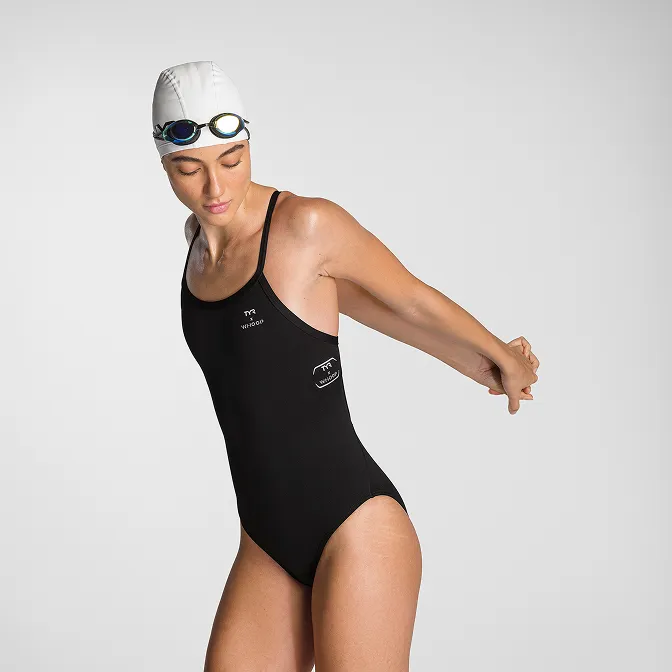
Product A
SQUARE SHOT

%205.jpg)