

Product photography has always mattered in e-commerce. What's changed is the speed at which shoppers judge it. Purchasing decisions happen in seconds, based almost entirely on what they see. Your images either earn the click or lose it.
AI photo editing has shifted the production equation. Tools that once required entire teams to operate now handle background removal, color correction, retouching, and consistency checks at scale. Whether you're processing hundreds of SKUs a month or turning around a seasonal drop, AI-powered editing delivers professional output faster and at a fraction of the previous cost.
The Rising Demand for Scalable Product Image Solutions
The volume problem is real. E-commerce brands are expected to produce more product images, across more social media platforms, on tighter timelines, with budgets that haven't scaled to match. Traditional editing workflows weren't built for this.
The business case for better imagery hasn't changed. Stores with professional product photography still convert 30-40% higher than those without. What has changed is how you get there. Manual editing at catalog scale is expensive and slow. AI photo editing closes that gap.
Modern AI editing platforms process entire catalogs in hours rather than days. The repetitive, time-consuming work gets handled automatically:
- Background removal and replacement
- Color correction and white balance
- Shadow generation and lighting adjustments
- Perspective correction and alignment
- Batch resizing for multiple e-commerce platforms
Recent research on generative AI in image editing confirms what practitioners are already seeing in production: these tools have matured fast, and are now handling complex editing scenarios that previously required skilled retouchers.
How AI Editing Differs from Traditional Retouching
Knowing the difference between AI-assisted editing and traditional post-production helps you make smarter decisions about your product photography workflow.
Traditional retouching means a skilled editor working through images manually in Photoshop. The quality ceiling is high. So is the cost, especially at volume.
AI photo editing works differently. It learns from patterns in your existing images and applies consistent edits across entire batches. Platforms like Claid.ai can automatically detect product edges, remove backgrounds, and apply brand-specific styling without human intervention.
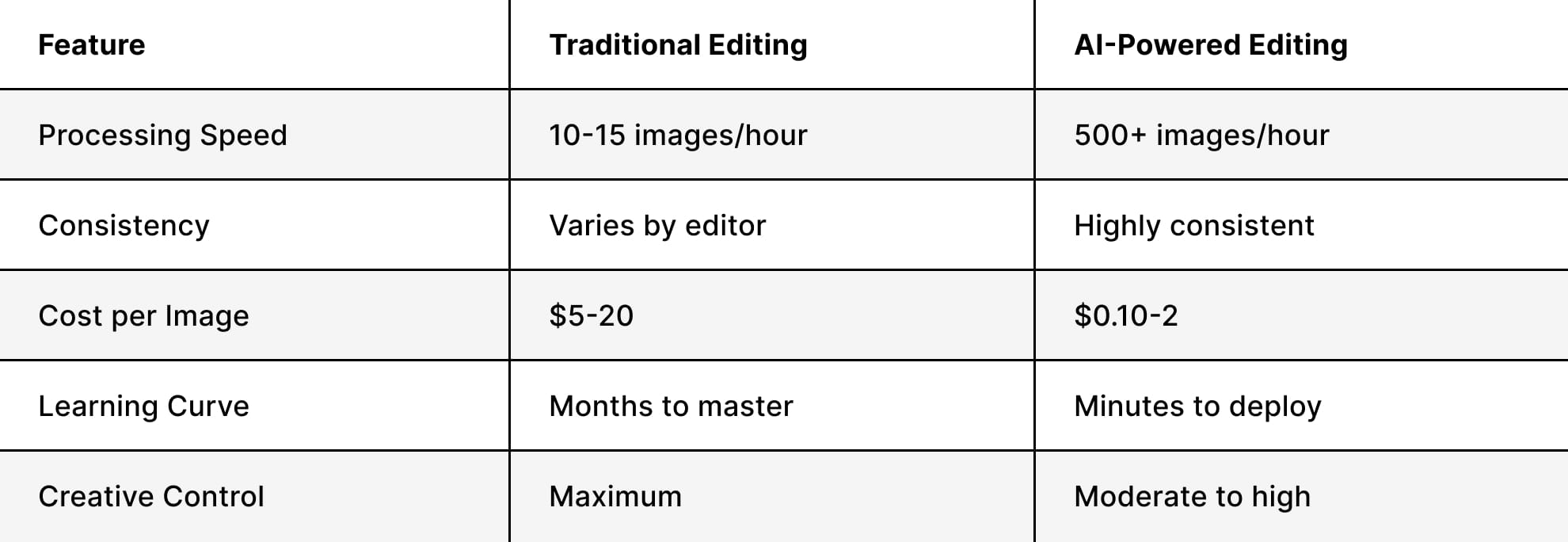
Neither approach replaces the other. The most effective workflow uses AI for standard, repeatable tasks and professional photography for hero images and creative campaigns where image quality is non-negotiable.
Key AI Editing Features That Transform E-commerce Images
Background removal gets the most attention, but it's only the starting point. Today's AI editing platforms address specific production problems that used to require significant time, skill, and budget.
Intelligent Background Removal and Replacement
Background removal is the most widely used AI editing feature, and the accuracy has reached a point where it handles genuinely difficult subjects: transparent glass, fine jewelry, and intricate fabric edges. Specialized e-commerce photo editing tools detect product boundaries that would have taken an experienced retoucher considerable time to mask manually.
The practical upside is significant. A fashion brand shooting 200 apparel items can shoot everything on a single backdrop and let AI handle the rest. The system knows that ghost mannequin shots require support removal, while handbag shots need clean white backgrounds that meet Amazon's requirements. Context-aware editing at scale.
Automated Color Correction and Enhancement
Color accuracy is a direct driver of return rates. When a product arrives looking different from its listing photo, the return is almost guaranteed. AI color correction addresses the variables that cause that mismatch:
- White balance for accurate color representation
- Saturation levels that make products stand out without looking artificial
- Contrast and brightness for optimal visibility
- Skin tone consistency in lifestyle scenes with models
It also solves the multi-session consistency problem. If you're shooting products across different days, locations, or lighting conditions, AI tools normalize the color palette across the entire catalog. Everything looks like it was shot together.
Smart Shadow and Reflection Generation
Shadows and reflections aren't decorative. They add depth, ground the product visually, and signal quality. AI generates these elements automatically based on product shape and light direction.
Where this matters most:
- Footwear, where shadow placement directly affects perceived quality
- Electronics, where subtle reflections suggest a premium finish
- Furniture and home decor requiring realistic floor shadows
- Beauty products, where highlights and reflections communicate luxury
Advanced platforms learn your preferred shadow style over time. Whether you want soft diffused shadows for home decor or crisp, defined shadows for technical products, the AI adapts to your spec rather than applying a generic default.
Batch Processing and Workflow Efficiency
Editing images one at a time isn't a workflow. It's a bottleneck. When you're launching a new collection or turning around a seasonal campaign, batch processing is what makes the timeline realistic.
A lot of platforms let brands upload hundreds of images simultaneously and apply consistent edits across the entire set. That matters because Shopify's image requirements differ from Amazon's, which differ from Instagram's. Manual reformatting at that volume isn't feasible.
Creating Platform-Specific Image Variants
Every sales channel has its own specs. Instagram wants square formats. Amazon has strict pixel requirements. Your Shopify store needs both detail shots and lifestyle images. AI editing tools generate all the variants automatically from a single source file:
- Square crops for social media
- Vertical formats for mobile shopping
- Wide banners for website headers
- Thumbnail versions for category pages
- Zoom-friendly high-resolution files for detail views
Combined with a clear understanding of e-commerce image standards, this multi-format approach means your products look right wherever a customer finds them — without rebuilding each asset from scratch.
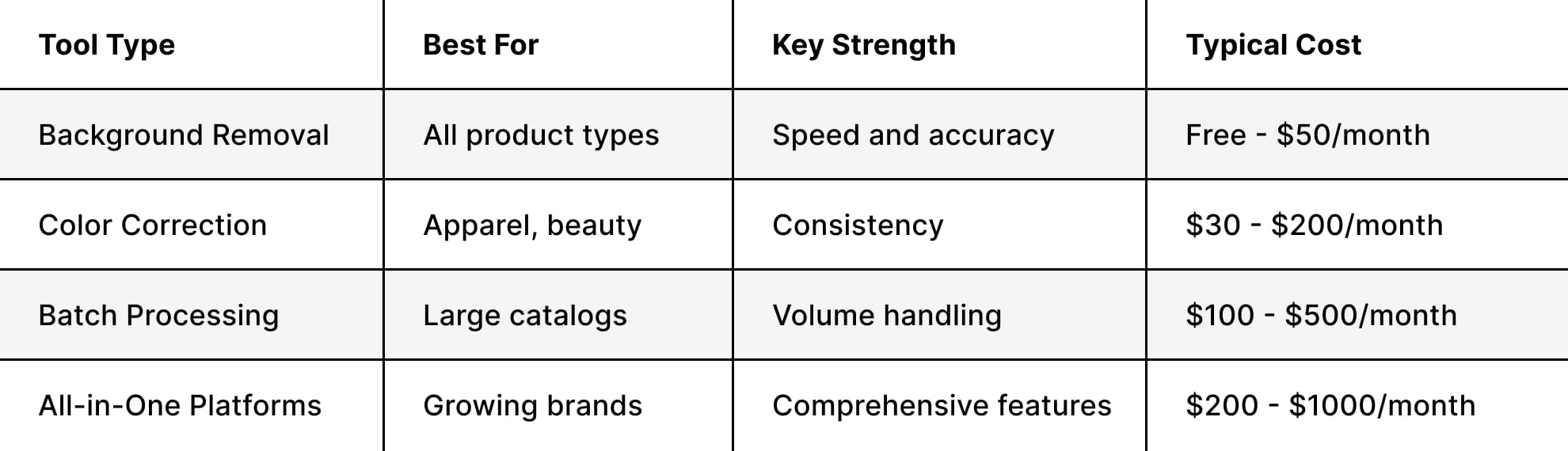
AI Tools and Platforms Reshaping Product Photography
The AI photo editing market has grown fast. The options are good. Knowing which tools fit which use case is what separates smart budget allocation from expensive experimentation.
Natural Language Editing Interfaces
The most accessible shift in AI editing is the move to plain English commands. Platforms like Aluo's AI Photo Editor let users describe what they want instead of navigating complex software: "remove background and add soft shadow" or "brighten product and increase saturation by 20%." No learning curve, no specialist required.
For smaller e-commerce operations without dedicated retouching teams, this changes what's actually achievable in-house.
Specialized Retouching Agents
The more significant development is context-aware editing. Research into intelligent retouching agents like JarvisArt shows AI systems that understand category-specific requirements: jewelry needs different treatment than apparel, which differs from food photography. The system recognizes context and adjusts accordingly.
For brands shooting across multiple product categories, contextual awareness solves the problem that made early automated tools unreliable. A single set of parameters applied uniformly across a diverse catalog produces inconsistent results. Category-aware AI doesn't.
Integration with Creative Workflows
The most effective brands aren't using AI editing as a standalone step. They're building it into an end-to-end content pipeline. A product gets shot, AI handles the editing and optimization, and those polished assets feed directly into the next stage of production.
Platforms like AdsRaw take optimized product images and transform them into UGC-style video ads built for social performance. One shoot. Multiple formats. A content pipeline that runs from initial photography through to final marketing asset without starting over at each stage.
Balancing AI Automation with Professional Photography
AI editing delivers real efficiency gains. But the brands getting the most out of it aren't using it as a replacement for professional photography. They're using it to extend what professional photography produces. The question of whether to use AI product images isn't binary. It depends on the context and what's at stake.
When to Invest in Professional Shoots
Some scenarios don't have an AI substitute.
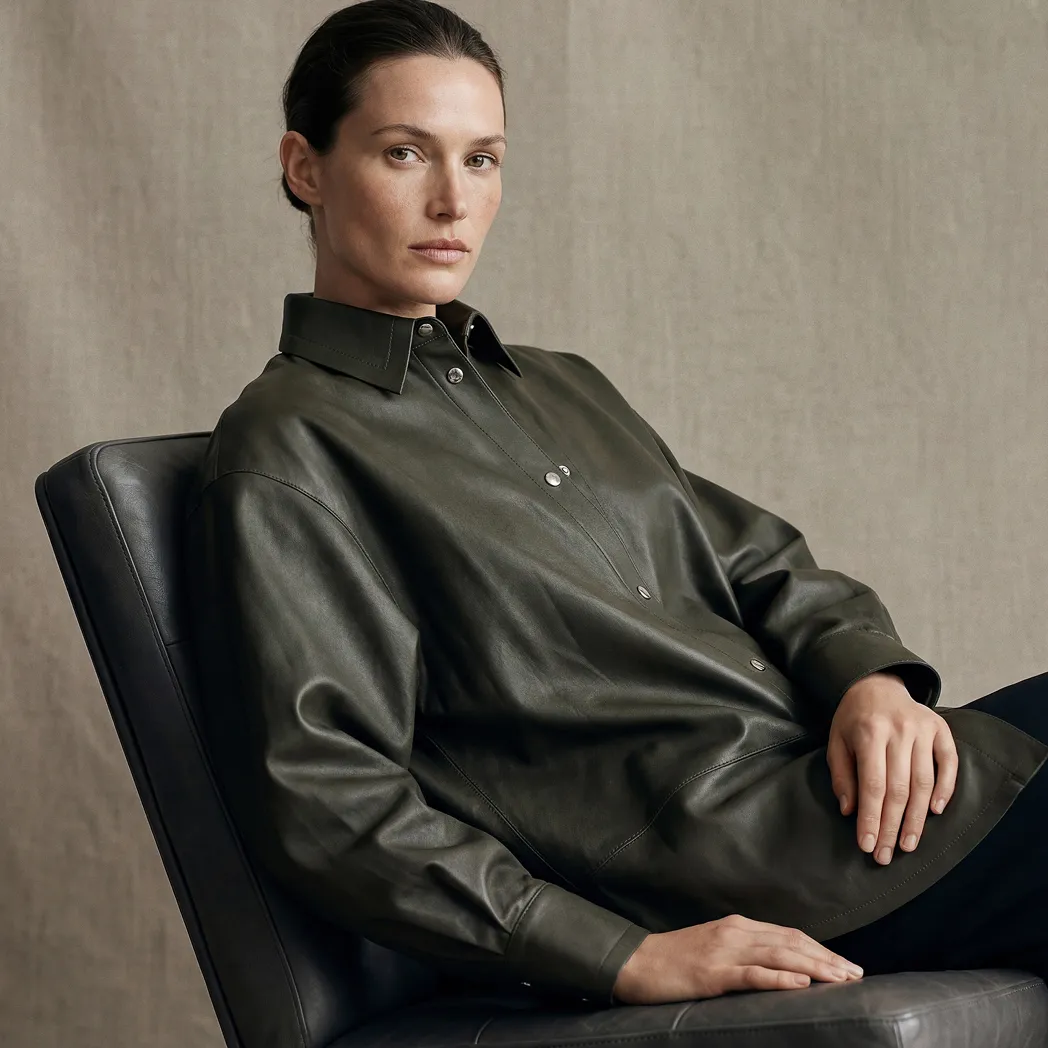
Hero images and lifestyle shots require creative direction, styling expertise, and the ability to communicate brand identity visually. Apparel photography depends on lighting setups that create depth and texture in ways AI can't replicate from a flat source file.


Complex product categories like jewelry demand specialized techniques. Knowing how to avoid common jewelry photography mistakes comes from experience, not automation.
Campaign imagery, lookbooks, and seasonal launches need genuine creative thinking. AI is good at standardization. It isn't good at conceiving visual concepts that differentiate a brand.
The Hybrid Workflow That Actually Works
Professional photographers shoot high-quality source images with proper lighting, composition, and styling. AI handles the repeatable post-production work: background removal, color normalization, resizing, and platform optimization. Your team stays focused on creative direction and styling while AI manages the technical volume.
This is exactly the model behind Squareshot's AI services: professional photography as the foundation, AI-assisted production to scale it efficiently across formats and channels. The source material is shot to a standard that holds up under AI processing, which is what separates clean, consistent output from images that look like they've been through a filter.
Recent research on generative AI and user experience supports what practitioners already know: consumers respond well to AI-enhanced images as long as they accurately represent the product. Authenticity is still the line you can't cross.
Cost-Benefit Analysis by Business Size
The ROI calculation for AI photo editing looks different depending on where you are in terms of catalog size and production volume.
Small Businesses and Startups
For stores managing 50-200 SKUs, the savings are immediate. Manual retouching runs $10-15 per image. Automated tools bring that down to $0.50-2. On a 100-image product launch, that's $1,000 back in the budget before you've sold a single unit.
Most platforms offer free tiers that cover the basics: background removal, simple color adjustments, and standard resizing. Enough to get started without a software commitment.
Mid-Market Brands
At 500-2,000 products per month, AI editing stops being a cost-saving measure and starts being infrastructure. Manual workflows at this volume create bottlenecks that delay launches and slow time-to-market.
The calculation shifts. It's no longer about cost per image. It's about what a two-week delay in getting product live actually costs in lost revenue. That number usually dwarfs the subscription fee.
Enterprise Operations
Large retailers processing thousands of images monthly need enterprise-grade solutions: robust APIs, custom integrations, and quality control workflows built for scale. The typical setup combines:
- Professional photography for hero and campaign images
- AI batch processing for standard catalog shots
- Human QA to catch edge cases
- Automated delivery to multiple sales channels
At this level, the goal isn't just cost reduction. It's maintaining consistent quality across a massive catalog spanning multiple categories, brands, and channels simultaneously.
Quality Control and Brand Consistency
Speed means nothing if the output doesn't meet your standards. Quality control is where a lot of AI editing workflows break down, and it's usually because brands skip the setup work upfront.
Establishing Brand Style Guidelines
AI tools perform best with clear parameters. Before you run a single batch, document your specifications:
- Background colors by product category
- Shadow angle, intensity, and color
- Brightness and contrast ranges by product type
- Approved color palettes and treatments
- Margin and padding requirements by platform
Most modern platforms let you save these as presets. Once configured, every edited image automatically applies your background choices and brand specifications without manual intervention. The setup investment pays back immediately at volume.
Human Review Checkpoints
Full human review at scale isn't realistic. Zero human review is a risk. The answer is structured spot-checking at key points in the workflow.
First run review: When using a new tool or editing a new product category, review the first batch thoroughly. Catch systematic issues before they propagate across hundreds of images.
Random sampling: Review 5-10% of processed images on an ongoing basis. Image quality drift is real, and it's easier to catch early than correct retroactively.
Edge case escalation: Configure your platform to flag low-confidence edits automatically, routing them to a human editor rather than letting the AI guess. Transparent glass, complex backgrounds, and fine detail shots are common triggers.
The layered approach keeps quality high without rebuilding the bottleneck you used AI to eliminate in the first place.
Future Trends in AI Photo Editing
The gap between photography and digital creation is closing faster than most brands are prepared for.
Generative AI for Product Visualization
Research into guided image synthesis points toward a near future where brands generate product images in any setting without physical staging. Furniture in a modern loft, a traditional dining room, and a minimalist studio, all from a single source image. No set builds, no location fees, no scheduling.
For categories like home decor, where context drives purchase decisions but multi-setting shoots are cost-prohibitive, this is a significant shift.
Real-Time Editing and Interactive Commerce
The next development is AI editing that responds to individual shoppers in real time. A customer selects their preferred background color or lighting condition, and the image updates instantly, generated from a single master shot. The same product, personalized to the browsing context, without any additional photography.
Take it further: a shopper in a coastal location sees sunglasses styled for outdoor environments. Someone in a city sees the same product in an urban context. Personalized visual merchandising at scale, automated.
Integration with Augmented Reality
As AR shopping moves from novelty to expectation, AI editing tools are becoming the engine behind it. The same technology that removes backgrounds now generates the depth maps and 3D models that power virtual try-on and room visualization features. Background removal was the entry point. Immersive commerce infrastructure is where it's heading.
Choosing the Right AI Editing Solution
There are dozens of platforms competing for the same budget. The right choice depends on your specific operation, not on feature lists or marketing claims.
What to Evaluate
Volume and frequency. How many images do you process monthly? Tools built for batch processing at scale are different from those designed for occasional use. Know which category you're in before you start comparing.
Product complexity. Simple products with clean edges, books, boxes, and flat apparel require less sophisticated AI than transparent glassware, intricate jewelry, or textured materials. Match the tool's capability to what you're actually shooting.
Integration requirements. Does the platform need to connect with your PIM, DAM, or e-commerce stack? API availability and integration depth determine whether the tool fits into your workflow or creates a new silo.
Customization needs. Generic AI handles standard product shots adequately. Distinctive brand aesthetics require platforms that support style learning and extensive parameter customization.
Budget. Pricing models vary significantly, from per-image charges to monthly subscriptions to enterprise licenses. Calculate your true cost per image across realistic usage scenarios, not best-case ones.
Test Before You Commit
Free trials exist for a reason. Before signing anything, run your actual product images through the platform:
- Upload 20-30 representative images across your product range
- Process using the platform's recommended settings
- Review results against your brand standards
- Calculate actual time savings versus your current workflow
- Test support responsiveness before you need it urgently
The best AI tool for product photos isn't universal. A solo founder launching a handmade jewelry line has different requirements than a multi-brand fashion retailer managing seasonal drops. Define your criteria first, then find the platform that fits them.
Implementation Strategies for AI Adoption
Subscribing to a platform is the easy part. Getting real value out of it requires deliberate implementation.
Phased Rollout
Don't switch your entire catalog over at once. Start contained and scale with confidence.
Phase 1, pilot testing: Pick one product category or collection. Run it through AI editing and treat it as a live test. Surface workflow issues before they affect everything.
Phase 2, process refinement: Take what the pilot revealed and adjust. Refine your settings, update your style guides, tighten your QA checkpoints. Document what works.
Phase 3, expanded deployment: Roll out to additional categories with the lessons already applied. Monitor quality metrics and customer feedback as you scale.
Phase 4, full integration: Once you're confident in the results, make AI editing standard practice across the catalog, while keeping professional photography in place for hero images and strategic campaigns.
Team Training and Change Management
The platform is only as effective as the people using it. Invest in proper onboarding:
- Walk editors and photographers through the platform hands-on
- Document clear protocols for common editing scenarios
- Define explicitly when to use AI versus manual editing
- Create a shared channel for tips, edge cases, and troubleshooting
One thing worth addressing directly: some team members will worry that the technology threatens their role. Frame it accurately. AI handles the repetitive, low-judgment work. That frees skilled editors for creative tasks that actually require their expertise. That's a better use of their time, not a replacement for it.
AI photo editing has moved from experimental to essential. It handles the repetitive work, keeps catalogs consistent, and compresses production timelines in ways that weren't possible a few years ago.
But efficiency tools work best with quality source material. Pairing AI editing with professional photography is what separates brands that scale fast from brands that scale well. Squareshot provides the expert photography and retouching that give AI something worth working with, so your catalog grows without your visual standards slipping.
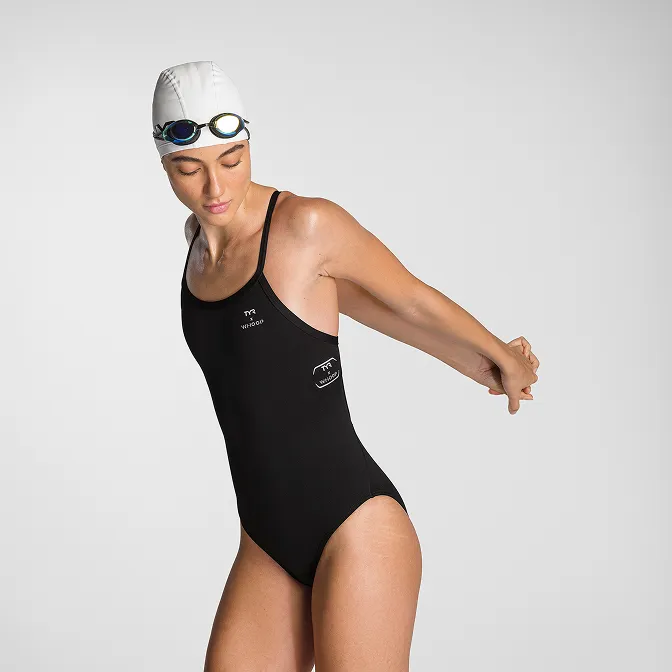
Product A
SQUARE SHOT
%202.jpg)