

AI product photography is no longer a future-facing concept.
It's a production decision brands are making right now. The tools have matured, the workflows have changed, and the brands that understand how to integrate AI into their content pipeline are producing more — with more consistency — than those that don't.
This isn't about replacing your photographer. It's about building a smarter system around them: faster turnaround, lower cost per asset, and the ability to scale visual content without sacrificing quality. Whether you're managing a product catalog of 50 SKUs or 5,000, knowing how AI fits into your photography workflow isn't optional anymore; it's operational.
What AI Can and Cannot Do With Product Images
Before committing to budget or workflow changes, understand what AI product photography tools actually deliver — and where it still falls short.
What's production-ready in 2026:
Background removal and replacement have become genuinely reliable. Edge detection is precise enough that most clean product shots on neutral backgrounds process without manual cleanup. Color correction and batch consistency work well when source images are shot under controlled conditions.
Shadow and reflection synthesis has improved significantly — the outputs are no longer obviously artificial. Format resizing and marketplace compliance automation (white backgrounds, specific crop ratios, file specs) is one of AI's clearest practical wins.
Where AI still falls short:
Texture fidelity is the most common disappointment. Leather grain, fabric weave, ceramic glaze — AI tends to smooth or misrepresent surface detail in ways that matter for purchase decisions. Creative direction is another hard limit. AI can apply a style, but it cannot originate one. It has no understanding of your brand positioning, your customers’ expectations, or what makes your product different from a competitor's.
Complex lighting scenarios — the kind that give jewelry its brilliance or make a glass bottle look premium — still require a photographer who understands how light behaves on specific materials.
The gap between expectation and output:
Most brands overestimate generative AI capabilities and underestimate its enhancement capabilities. It's excellent at multiplying and adapting professional source material. It's unreliable as a replacement for capturing that source material in the first place. That distinction drives every smart implementation decision.
The Real Cost Breakdown: AI Tools vs. Studio Production
The numbers are compelling — but only when read correctly.
Direct cost comparison by volume:
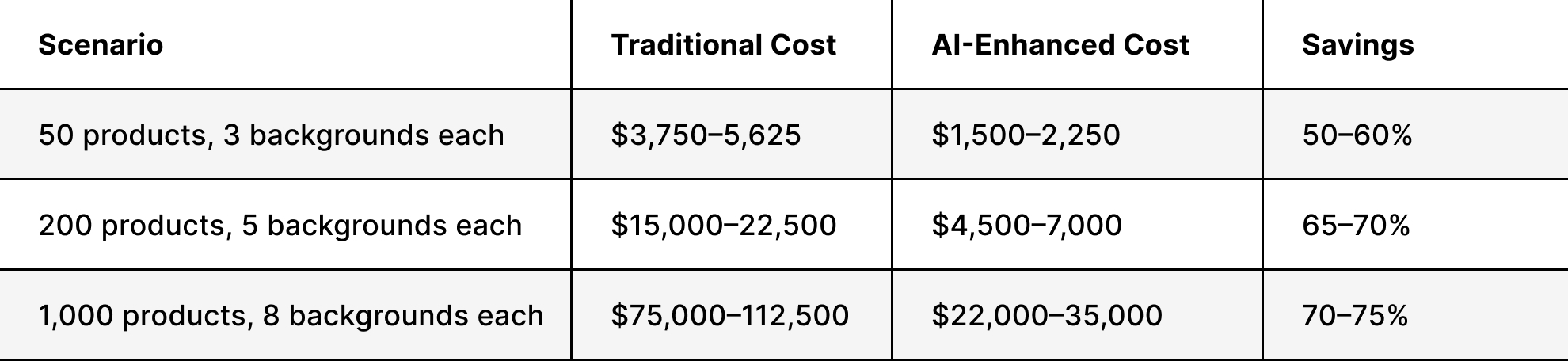
A practical example: a footwear brand investing in shoe photography might spend $50–75 per product for traditional multi-background shoots. With AI, they shoot once at $20–30, then generate background variations for minimal incremental cost. Understanding product photography pricing structures helps you evaluate where that trade-off makes sense for your catalog.
The hidden costs on both sides:
AI tools have their own cost structure that's easy to underestimate. Subscription fees stack up. Outputs that don't meet brand standards require revision time. Inconsistent results across a large catalog can create more retouching work than you'd have had with studio production. And if source images weren't shot with AI processing in mind — proper backgrounds, controlled lighting, correct angles — the AI outputs will reflect that.
Traditional production has its own inefficiencies: reshoots for seasonal updates, the cost of generating variations, and the time lag between shoot and delivery. These are real costs that AI solves well.
The honest summary:
AI delivers genuine savings at volume, particularly for background variations and batch enhancement. It doesn't eliminate the need for professional photography — it rather changes where that investment goes and multiplies its output. The brands getting the best ROI are treating studio production as a source-material investment, not a per-image cost.
Where AI Fits in a Professional Shoot Pipeline
The most effective implementations aren't AI-first or studio-first — they're structured. AI has a defined role at each stage, and knowing where that role starts and ends prevents the quality problems that come from over-relying on automation.
Pre-shoot: AI's contribution here is limited but useful. It can help generate mood boards, test compositional concepts, and model what different background treatments might look like before committing to a setup. It saves creative time, not shoot time.
Shoot: This is where human expertise is non-negotiable. No AI tool can fix fundamentally poor photography. Properly lit, well-composed images captured by experienced photographers are the foundation on which everything else depends. Investing in solid product photography workflows at this stage determines the ceiling on everything AI can do afterward.
Post-production: This is where AI earns its budget. A practical workflow most brands are adopting:
- Professional capture — products on neutral backgrounds with controlled lighting
- AI background removal — clean separation from the source background
- Background generation — multiple lifestyle and contextual scenes from a single shot
- Batch enhancement — consistent color grading and retouching across the catalog
- Shadow and reflection synthesis — realistic environmental effects applied uniformly
- Format optimization — automated resizing and spec compliance for each platform
This approach maximizes the value of the initial investment in the shoot. You're not spending more on photography — you're getting more from what you've already captured.
Platform-Specific Optimization: Where AI Has a Real Edge
Different platforms have different requirements — and managing compliance across all of them manually is one of the clearest inefficiencies in e-commerce content production. This is where AI delivers consistent, measurable value.
Amazon requires white backgrounds for main product photos, specific image dimensions, and strict technical specs. AI handles this automatically — background replacement, crop adjustment, file formatting — at a fraction of the cost of reshooting for compliance.
Shopify merchants benefit from AI's ability to generate properly optimized images that load efficiently across device types while maintaining image quality. Compression without quality loss, responsive sizing, and consistent aspect ratios are all tasks AI handles reliably at scale.
Instagram and social platforms require different aspect ratios, different energy, and often different background treatments than marketplace images. AI can repurpose professional product shots into social-ready formats with lifestyle backgrounds — turning one studio session into content for multiple channels.
The strategic play is building a workflow that generates all required variations from a single high-quality source image.
One shoot. Every platform covered.
That's the efficiency gain that justifies the investment.
Maintaining Brand Consistency When AI Is in the Mix
Automation scales whatever standards you've set — good or bad. If your brand guidelines aren't documented precisely, AI will produce consistent output that consistently misses the mark.
Why brand standards break down:
Most consistency failures aren't AI failures — they're brief failures. AI tools need explicit parameters: exact background values, shadow angle and intensity, color temperature, and acceptable composition range. Vague direction produces vague results. Brands that create detailed photography style guides before implementing AI see significantly better output consistency than those that don't.
Configuring AI tools around your visual identity:
At a basic level, this means saving tool presets that match your documented specifications and running every output against approved reference images before it enters your catalog. At a more advanced level, it means training custom models on your existing approved imagery.
The custom training process typically involves:
- Gathering 500–1,000 approved brand images
- Annotating them with quality markers
- Fine-tuning an existing model or training a custom one
- Testing outputs against brand standards
- Iterating based on results
The upfront investment is significant. For brands producing thousands of product images annually, it pays for itself quickly. For smaller catalogs, well-configured presets within an off-the-shelf tool will usually do the job.
The role of human review:
Custom training doesn't eliminate the need for quality control — it raises the baseline so human review catches fewer problems. A multi-stage review system still makes sense: automated checks for technical specs, visual comparison against approved samples, and human sign-off before assets go live. AI-enhanced production at the studio level typically includes both automated and expert human review as standard.


How to Evaluate AI Photography Tools for Your Brand
The AI photography tool market has expanded fast, and the marketing has outpaced the actual capabilities. Evaluating platforms against e-commerce output requirements — not general AI benchmarks — is what separates useful tools from expensive ones.
Criteria that actually matter for product photos:
Output consistency across different product types is the most important test. A tool that handles apparel well may struggle with reflective surfaces or complex shapes. Test it against your actual product categories before committing.
Processing speed for batch operations matters at scale. A tool that takes 30 seconds per image becomes a bottleneck at 500 SKUs.
Integration with your existing workflow — whether that's a DAM system, your e-commerce platform, or your post-production software — determines how much manual work remains between AI output and published asset.
Customization options for brand-specific requirements separate professional tools from consumer ones. If you can't save and apply consistent brand presets, you're reapplying settings manually every time.
Cost structure relative to volume needs varies significantly. Some tools charge per image, others by subscription tier. Model the cost against your actual projected volume before deciding.
Tool categories worth understanding:
Specialized product photography AI platforms focus exclusively on commercial imaging. They understand marketplace conventions and deliver outputs optimized for e-commerce — templates for common product categories, built-in knowledge of platform requirements. General AI image editors like Adobe Photoshop now include multiple AI engines within familiar software, which suits teams already embedded in those workflows.
Red flags in AI tool marketing:
Before/after examples that only show best-case scenarios. No documentation of how the tool handles edge cases — complex backgrounds, transparent packaging, reflective materials. Pricing that looks cheap per image but has sharp volume cliffs. No clear data on output resolution or file format control.
Combining AI With Studio Expertise: The Hybrid Model
The brands getting the best results aren't choosing between AI and professional photography. They're using both, in the right sequence, for the right tasks.
What the studio brings that AI cannot replicate:
Creative art direction that connects to brand strategy. Technical capture that gives AI the best possible source material to work with. Understanding of how specific materials — leather, glass, ceramics, textiles — behave under light, and how to photograph them so that their behavior reads correctly on screen.
The quality judgment that catches subtle issues before they reach a customer. These aren't soft skills — they're the foundation the entire workflow depends on.
This is especially true for categories where capturing material quality is the whole point. Jewelry photography requires expertise in reflective surfaces and gemstone rendering that AI can enhance but cannot originate. Visual concepts still require human creative direction even when AI handles execution.
What AI contributes to the hybrid model:
Scalability for producing high volumes quickly. Consistency in applying defined standards across a large catalog. Variation generation for testing different presentations without additional shoots. Efficiency in repetitive enhancement tasks that would otherwise consume professional retouching time.
How to structure the hybrid workflow:
Invest professionally in hero images and key products — the shots that anchor your brand aesthetic. Use AI to generate variations, seasonal updates, and platform-specific versions from that professional source material. For catalog photography, this approach consistently delivers better per-asset economics than either all-studio or all-AI production.
The hybrid model isn't a compromise — it's the current best practice. Professional photographers are integrating AI into their own workflows because it lets them deliver more from the same shoot. Studios that offer AI-enhanced packages are giving clients better value, not a reduced product.
Making the Decision: A Framework for Brand Operators
The right approach depends on your catalog size, brand tier, and the problem you are trying to solve.
Small e-commerce brands (under 100 SKUs): Start with AI tools that offer templates and presets. This allows quick catalog building without significant upfront investment. Prioritize tools that handle your specific product category well. Master one platform before expanding. For hero images and brand-defining shots, professional photography is still worth the investment — AI will multiply its value across the catalog.
Mid-sized retailers (100–500 SKUs): Hybrid is almost always the right answer. Invest in professional photography for hero images and top-performing products. Use AI for variations, seasonal updates, and platform-specific versions. Build out documented brand standards before scaling AI use — consistency failures are harder to correct at volume. Proper white background setups and controlled lighting at the shoot stage will directly determine AI output quality downstream.
Large brands with extensive catalogs (500+ SKUs): Enterprise-level AI solutions that integrate with existing DAM systems and enforce brand guidelines become worthwhile. Custom model training on your specific product categories and visual standards pays off at this volume. The investment in consistent product photography standards upfront saves significant remediation costs later.
The honest starting point: identify the specific problem you're trying to solve — volume, speed, cost, variation, platform compliance — and choose tools based on that. AI product photography works best when it's solving a defined problem, not implemented as a general modernization initiative.
AI product photography has matured from experimental novelty to a practical production tool. It delivers genuine value when implemented with clear objectives, solid source material, and documented brand standards. It underdelivers when treated as a shortcut past the fundamentals.
The brands winning with AI aren't replacing their photography investment — they're restructuring it. Do less repetitive production work. Make every professional shoot go further. Better consistency across more platforms with less manual work.
Squareshot combines professional photography expertise with AI-enhanced production to deliver high-quality product images at scale — without trading brand standards for efficiency.
Product A
SQUARE SHOT