

Product photography has transformed dramatically with artificial intelligence, and nowhere is this more evident than in background removal. What once required hours of meticulous manual editing can now happen in seconds, allowing photographers and brands to focus on creativity rather than tedious post-production work.
The integration of AI background removal into modern workflows has become essential for businesses competing in the fast-paced e-commerce landscape, where speed and consistency matter as much as quality.
Understanding AI Background Removal Technology
The core technology behind AI background removal relies on deep learning models trained on millions of images. These neural networks learn to distinguish between product edges and backgrounds with remarkable accuracy, even handling complex scenarios like transparent glass, fine hair-like textures, or intricate jewelry details.
Modern AI algorithms analyze each pixel in an image, assigning probability scores to determine what belongs to the product versus the background. This process, called semantic segmentation, has improved exponentially since 2023. Research into interpretable feature visualization through background removal has shown how targeted removal creates cleaner, more accurate product isolation.
Key advantages of AI-powered removal include:
- Processing speed up to 100x faster than manual editing
- Consistent image quality across large product catalogs
- Ability to handle batch processing for thousands of images
- Automatic edge refinement that preserves fine details
- Integration with existing photography workflows
The technology continues to evolve. Advanced systems now incorporate human feedback evaluation frameworks to ensure product consistency and accurate background inpainting, addressing one of the primary concerns professional photographers have about automated solutions.
Choosing the Right AI Tools for Your Workflow
Not all AI background removal tools deliver equal results for product images. The market offers everything from consumer-grade mobile apps to professional-grade software suites designed specifically for commercial applications.
When evaluating tools for AI background removal product photography, consider these critical factors:
Processing Quality and Edge Detection
The most sophisticated tools excel at handling challenging scenarios. Look for software that maintains sharp edges on hard products like electronics while also preserving soft, natural transitions on fabrics or organic materials. Testing with your specific product types reveals which tools perform best for your inventory.
Batch Processing Capabilities
For catalog shoots involving dozens or hundreds of products, batch processing becomes non-negotiable. Professional solutions allow you to apply consistent background removal settings across entire folders, maintaining uniform quality throughout your catalog.
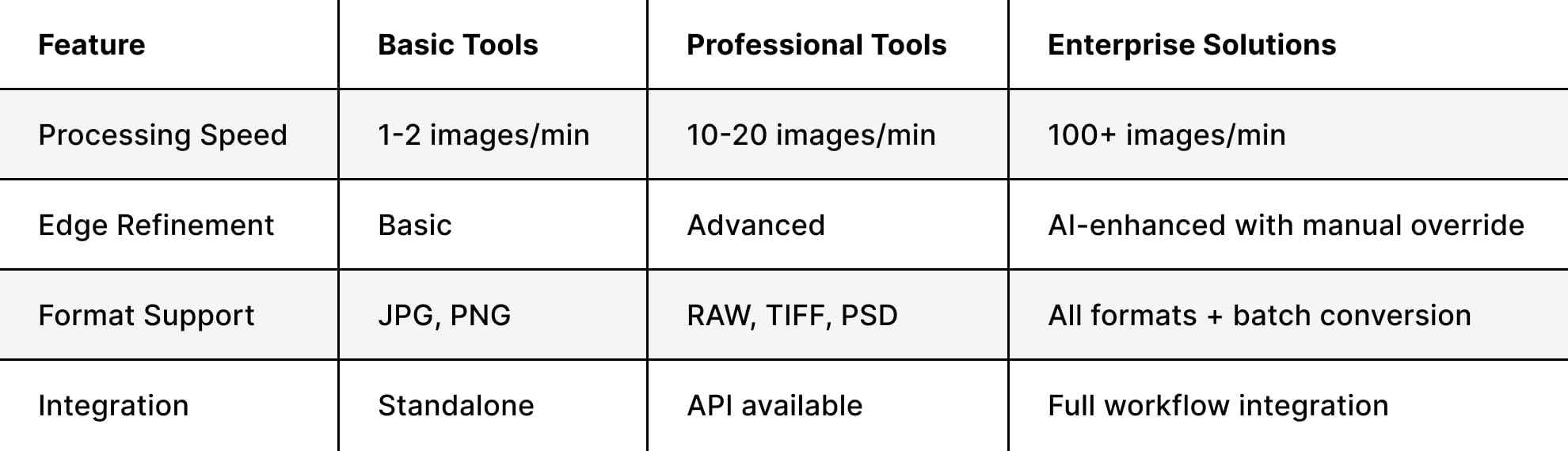
Many photographers discover that AI-powered retouching software offers comprehensive background adjustment features beyond simple removal, enabling complete scene transformation within a single platform.
Optimizing Your Product Photography Setup
While AI handles background removal with impressive accuracy, your initial photography setup significantly impacts final results. Smart shooting practices reduce AI processing time and improve output quality.
Lighting Considerations
Proper lighting creates a clean separation between products and backgrounds. Avoid harsh shadows that bleed onto or behind your subject. Three-point lighting setups work exceptionally well because they minimize unwanted shadow artifacts that AI algorithms might struggle to interpret correctly.
Recommended lighting approaches:
- High-key setup: Overexpose your white background slightly (about 1-2 stops brighter than your subject) to create natural separation
- Edge lighting: Add rim lights to define product boundaries, especially for dark or transparent items
- Diffused main light: Soft, even illumination reduces complex shadow patterns
- Background light: Separately light your backdrop to ensure even tone across the entire surface
The photography techniques that enhance visual branding often translate directly into easier AI processing. Clean, well-lit shots require minimal correction, allowing AI to focus on precise edge detection rather than compensating for poor exposure.
Background Selection
Counter-intuitively, you don't always need a perfectly white background for AI background removal in product photography. Solid, contrasting backgrounds often work better because they help AI algorithms define edges more accurately.
For transparent or reflective products, consider using gradient backgrounds that provide visual context while still allowing clean removal. The AI can distinguish these controlled gradients from the product itself, whereas a pure white background might create ambiguity around glass or chrome surfaces.
Integrating AI Removal Into Professional Workflows
Professional product photography studios have developed sophisticated workflows that leverage AI while maintaining quality control. The key lies in understanding where AI excels and where human expertise remains essential.
The Hybrid Approach
The most effective implementations use AI for the initial heavy lifting, then apply human refinement where it actually matters: complex edges, challenging materials, and anything that needs a trained eye to get right. That combination delivers professional output at commercial speed, making it possible to handle larger volumes without the quality trade-offs that pure automation introduces.
This is the model behind Squareshot's AI services: products are photographed to a professional standard, then AI handles background removal, scene generation, and format optimization across whatever channels and contexts your brand requires. Platforms like Setlio have emerged to streamline parts of this workflow, but the output is only as strong as the source material going in.


Quality Control Checkpoints
Establish systematic review processes to catch AI errors before images reach clients or go live on your website. Focus on these common problem areas:
- Transparency issues: Glass, plastic, and reflective surfaces
- Fine details: Jewelry chains, fabric textures, product perforations
- Color bleeding: Where product colors might bleed into removal areas
- Shadow retention: Deciding which shadows to keep for dimensional context
The decision about whether brands should use AI product images often comes down to these quality considerations and how well your workflow manages them.
Advanced Techniques for Complex Products
Certain product categories present unique challenges for AI background removal, requiring specialized approaches beyond standard automated processing.
Handling Transparent and Reflective Items
Products like glassware, jewelry, and chrome accessories reflect their surroundings, incorporating background elements into the product itself. Advanced AI tools now recognize these reflections as part of the product, preserving them while removing the actual background.
For optimal results with these items:
- Use controlled reflection environments with neutral tones
- Photograph against complementary backgrounds that enhance rather than distract
- Leverage tools that understand material properties and preserve appropriate reflections
- Consider creating custom masks for particularly complex pieces
Research into AI-assisted decluttering systems demonstrates how algorithmic approaches can intelligently detect and remove unwanted background elements while preserving essential product characteristics, even in challenging scenarios.
Textured and Organic Products
Fabric products, food items, and natural materials feature irregular edges and textures that challenge even sophisticated AI. The solution involves capturing these products with sufficient depth of field to maintain sharp focus across their entire surface, giving AI clear edge data to work with.
Best practices for textured products:
- Increase aperture to f/8 or higher for maximum depth of field
- Use focus stacking for larger items requiring extensive sharpness
- Ensure even lighting across textured surfaces to avoid confusion between texture shadows and background
- Capture at higher resolutions (minimum 300 DPI) to preserve fine detail
Understanding various types of product photography approaches helps you select the right shooting style that complements AI processing capabilities.
Platform-Specific Considerations for E-commerce
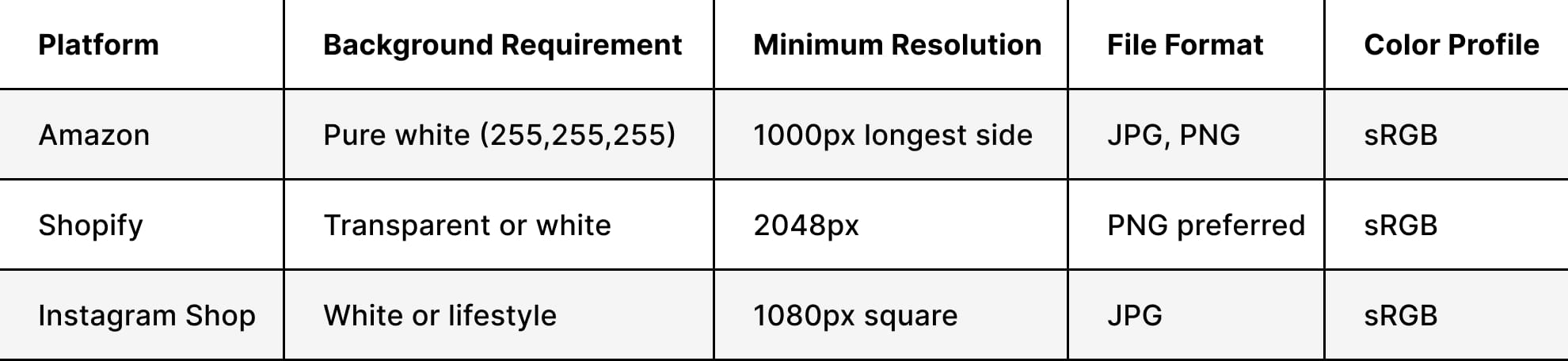
Different e-commerce platforms maintain specific image requirements that affect how you approach AI background removal product photography. Meeting these standards ensures your products display correctly and comply with marketplace guidelines.
Amazon Product Photography Standards
Amazon requires pure white backgrounds (RGB 255, 255, 255) for main product images. AI tools excel at creating these perfectly white backgrounds, but you need to verify color values rather than relying on visual assessment alone. Many AI platforms include Amazon-specific presets that automatically apply correct color values and image dimensions.
Multi-Channel Output Strategy
Smart workflows prepare images for multiple platforms simultaneously. After AI background removal, create a master file with a transparent background saved at maximum resolution. From this master, generate platform-specific versions with appropriate backgrounds, dimensions, and compression settings.
This approach, detailed in guides about e-commerce image standards, ensures consistency across all your sales channels while maintaining flexibility for future platform additions.
Maximizing Efficiency with Batch Processing
The real value of AI background removal shows up at scale. Processing a large product catalog manually takes weeks. Automated batch operations bring that down to hours.
Setting Up Batch Workflows
Effective batch processing requires careful preparation. Organize your images with consistent naming conventions, group similar products together, and establish clear folder structures that separate processed from unprocessed files.
Batch processing workflow steps:
- Preparation phase: Sort images by product type and complexity level
- Settings calibration: Test AI settings on representative samples from each category
- Automated processing: Run batch removal on grouped images with category-specific settings
- Quality review: Systematic inspection of outputs, flagging images requiring manual adjustment
- Refinement batch: Process flagged images with adjusted settings or manual intervention
- Final export: Generate platform-specific versions in required formats
Many photographers find that understanding AI tools specifically designed for product photos helps them select software with robust batch capabilities that match their volume requirements.
Handling Exceptions Systematically
Even the best AI systems occasionally misidentify edges or struggle with unusual product characteristics. Rather than attempting to process everything identically, develop a triage system that routes complex items to appropriate processing paths.
Create three processing tiers:
- Tier 1 (Simple products): Fully automated with minimal review, typically 70-80% of inventory
- Tier 2 (Moderate complexity): AI removal with mandatory manual edge refinement, approximately 15-20% of products
- Tier 3 (Complex products): Manual processing or heavily supervised AI assistance, remaining 5-10% of the catalog
Balancing Speed and Quality
The greatest challenge in AI background removal involves maintaining professional quality standards while achieving the time savings AI promises. This balance requires understanding both your quality requirements and your AI tool's capabilities.
Defining Quality Thresholds
Different applications demand different quality levels. Images for thumbnail views or category pages can tolerate minor imperfections invisible at small sizes, while hero images and detailed product views require pixel-perfect precision.
Establish clear quality criteria for each image type in your catalog. Document acceptable tolerances for edge smoothness, color accuracy, and detail preservation. These standards guide both your AI settings and your quality review process, ensuring consistency across your team.
Professional studios incorporating advanced retouching and production support typically maintain detailed quality guidelines that specify exactly when manual intervention supersedes automated processing.
Time Investment Analysis
Calculate the true time savings AI provides by tracking these metrics:
- Average AI processing time per image
- Quality review time per image
- Manual refinement time for flagged images
- Total time from raw file to deliverable product image
Compare these against your previous manual workflow times. Most studios find that AI background removal product photography reduces total processing time by 60-75% while maintaining equivalent quality, though results vary based on product complexity and quality requirements.
Future Developments in AI Background Technology
AI background removal is improving faster than most studios have adapted to. The current limitations around complex textures, transparent materials, and fine edges are being addressed directly in next-generation tools, and the capabilities are expanding well beyond background removal into broader scene manipulation and context generation.
Real-Time Processing Advances
New research into privacy-protecting background removal using LiDAR technology in mobile devices hints at future possibilities for instant, on-device processing during capture. This could enable photographers to see final results in real-time, adjusting composition and lighting based on the processed output rather than the raw capture.
Context-Aware Background Generation
The next evolution moves beyond removal to intelligent background creation. AI systems increasingly understand product categories and automatically generate appropriate backgrounds, whether studio environments, lifestyle scenes, or custom brand contexts that match your visual identity.
Platforms exploring AI background removal techniques demonstrate how these systems integrate removal with generation, creating complete visual workflows that transform product images from capture through final branded visuals.
Integration with Product Information
Future systems will likely combine background removal with product data, automatically adjusting backgrounds based on product attributes, category requirements, and destination platforms. This integration promises true end-to-end automation where photographers focus entirely on capture while AI handles all post-processing according to predefined brand guidelines.
Cost-Benefit Analysis for Professional Studios
Understanding the financial implications of implementing an AI background removal for product photography helps studios make informed decisions about tool selection and workflow integration.
Investment Considerations
Professional AI tools range from subscription services at $30-200 monthly to enterprise solutions costing thousands annually. Compare these costs against your current labor investment in manual background removal. Calculate your average hourly cost for retouching labor, multiply by hours spent on background removal monthly, and compare against AI subscription costs.
Typical cost breakdown (monthly):
- Manual retouching labor (40 hours at $35/hour): $1,400
- Professional AI subscription: $100-300
- Monthly savings: $1,100-1,300
- Annual savings: $13,200-15,600
Studios processing catalog-scale photography typically achieve ROI within the first month of implementation, with savings scaling proportionally to catalog volume.
Hidden Benefits Beyond Direct Time Savings
Financial analysis should include less obvious advantages:
- Faster turnaround enables accepting more client projects
- Consistent quality reduces revision requests and client complaints
- Freed retouching capacity allows focusing on higher-value creative work
- Competitive advantage through faster delivery times
- Scalability to handle seasonal volume spikes without temporary hiring
These factors often prove more valuable than direct labor savings, particularly for studios competing on delivery speed and reliability.
Training Your Team for AI Integration
Successfully implementing AI background removal in product photography requires more than purchasing software. Your team needs training in both tool operation and the hybrid workflow that combines AI efficiency with human quality control.
Skill Development Priorities
Focus training on these critical competencies:
- AI tool mastery: Understanding software settings, batch processing, and output optimization
- Quality assessment: Recognizing when AI output meets standards versus requiring manual refinement
- Efficient refinement: Quickly correcting AI errors using complementary manual tools
- Workflow management: Organizing files, tracking processing status, and maintaining version control
Photographers who've built careers on manual workflows often push back on AI adoption initially. That's understandable. The framing that works isn't "AI does your job faster" — it's "AI handles the tedious parts so you can spend more time on the work that actually requires your judgment." Background removal, batch cleanup, and format optimization don't need a creative eye. Lighting, composition, and directing a shoot do. AI takes the first category off the plate entirely.
Measuring Team Performance
Track individual and team metrics to ensure effective AI integration:
- Images processed per hour before and after AI implementation
- Percentage of images requiring manual refinement
- Average quality review time per image
- Client satisfaction scores and revision rates
Regular review of these metrics identifies training opportunities and workflow refinements that optimize your AI investment.
Creating Consistent Brand Aesthetics
One advantage of AI background removal in product photography often overlooked involves achieving visual consistency across extensive product catalogs. AI applies identical processing to every image, eliminating the subtle variations that creep into manual workflows as different retouchers work on different products.
Establishing Style Guidelines
Define your brand's visual standards precisely, then configure AI tools to maintain these standards automatically. Document specifications for:
- Background color values (specific RGB or hex codes)
- Shadow styles (natural shadows, drop shadows, or no shadows)
- Edge treatment (hard edges, soft feathering, or natural transitions)
- Output formats and compression settings
- Color profiles and bit depths
These guidelines ensure every product image maintains brand consistency, whether you're shooting eyewear, home decor, or any other product category in your catalog.
Managing Multiple Brand Clients
Studios working across multiple brands get significant leverage from AI presets. Building custom configurations for each client means their visual standards are applied automatically at the start of every batch, without manually cross-referencing style guides for each project. The more clients you serve, the more that consistency at scale compounds into a genuine operational advantage.
AI background removal has moved from a time-saving shortcut to a core part of how professional product images get produced. Understanding what these tools do well and where they still need human oversight is what separates studios that scale quality from those that just scale volume. Whether you're processing dozens of products or thousands, Squareshot combines AI-powered production with experienced photographers to deliver consistent, high-quality imagery on timelines that keep your business moving.

Product A
SQUARE SHOT

%202.jpg)